
A new domain is a bot magnet. If you're using Cloudflare Pages or Workers, you have a 100,000-request daily limit on the free tier. Without specific security rules, automated scanners will exhaust that quota before you've even launched.
An attacker recently hit my domain with 6,000 requests in minutes using a simple Go script. They weren't looking for my content;
they were scanning for non-existent .php and .env files.
Here is how to configure your Cloudflare WAF (Web Application Firewall) to drop these requests at the edge so they don't count against your limits.
1. The "Non-Existent Tech" Filter
If you are hosting a static site on Cloudflare Pages, you are not using PHP or WordPress. However, bots will spend all day looking
for /wp-login.php or /xmlrpc.php.
Go to Security > Security Rules > Custom Rules and create a rule to block these immediately.
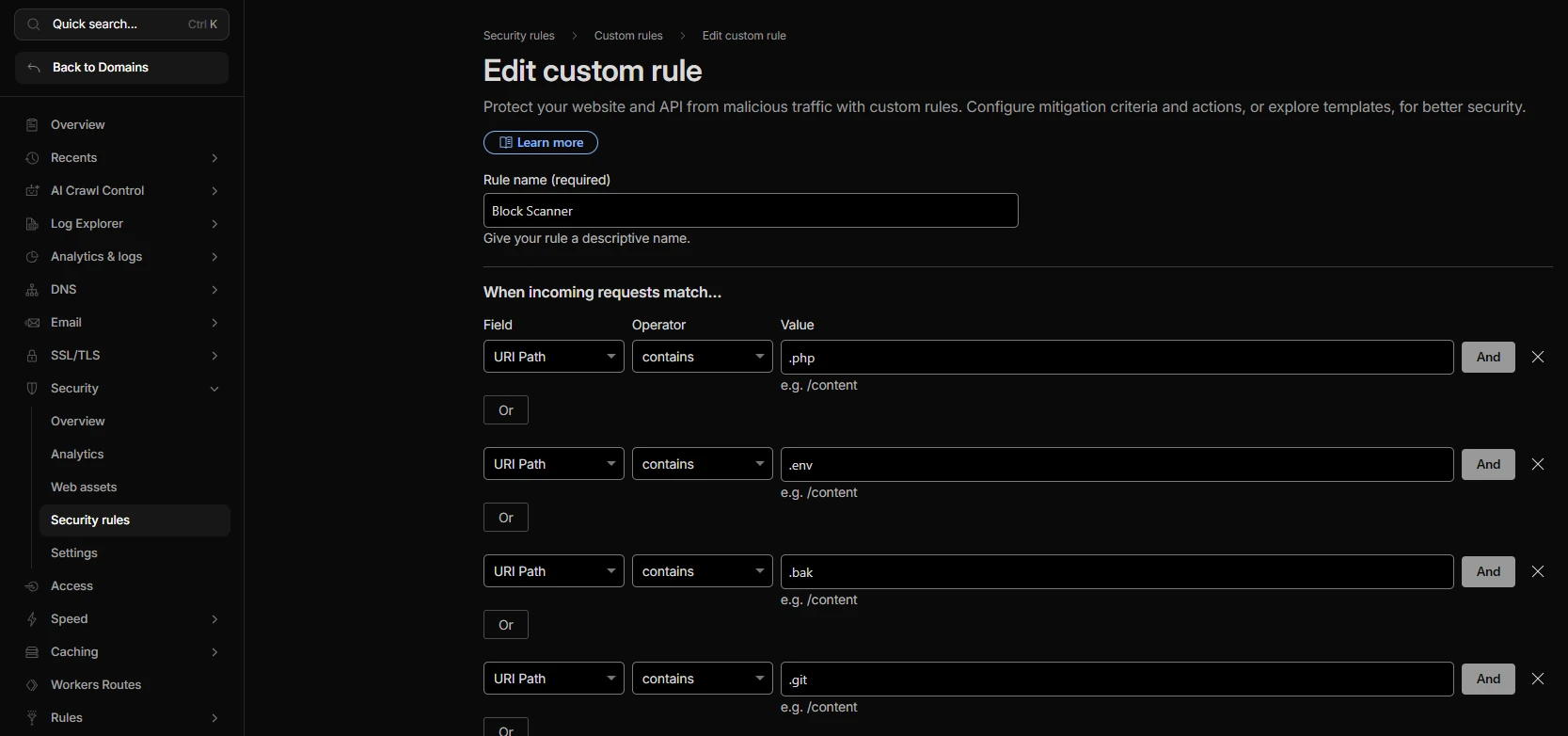
The Logic:
- Field:
URI Path - Operator:
contains - Value:
.php - OR
- Field:
URI Path - Operator:
contains - Value:
.env - OR
- Field:
URI Path - Operator:
contains - Value:
.bak
Action: Block.
Requests for these files will now be dropped by Cloudflare's global network. They will never reach your Worker or Pages function, meaning they cost you nothing.
2. Filtering Library-Based Bots
Legitimate traffic comes from browsers (Chrome, Safari, Firefox). Most simple attack scripts use default programming libraries like
Go's http.Client or Java's Apache-HttpClient. These scripts usually leave a footprint in the User-Agent
header.
Real mobile browsers (even on Android) send a Mozilla/5.0 string. Scanners often send -http-client.
The Rule:
- Expression:
(lower(http.user_agent) contains "-http-client") - Action: Managed Challenge.
Using a "Managed Challenge" is safer than a hard block. It forces the visitor to pass a JavaScript puzzle. A bot script will fail; a misconfigured but legitimate tool will pass.
3. Protecting Sensitive Directories
Attackers specifically target /config, /admin, and /backup directories. Even if you don't
have these, the request still costs you a hit against your quota.
Combine these into a single block rule:
wp-adminemail_config.gitxmlrpc
Why the WAF is mandatory
Cloudflare is a proxy. By default, it passes every request to your origin. If you handle a "404 Not Found" inside a Cloudflare Worker or Pages Function, you are paying for that request.
By moving these blocks to the WAF Custom Rules, you are filtering traffic at the network level.
The Setup Checklist
- Bot Fight Mode: Enable this in Security > Bots. It's a free, one-click toggle that challenges known bad bots.
-
WAF Custom Rules: Use your 5 free rules to block
.php,.env, and library-default User-Agents. - Security Level: Set this to "High" in the Settings tab. This challenges IPs that have shown malicious behavior on other Cloudflare sites.
Stop letting bots dictate your usage limits. Configure the WAF the moment you point your DNS to Cloudflare.